Salesforce Data Model Fundamentals
BA Academy — self-paced module
By the end of this module, you will be able to:
- Explain what the Salesforce data model is and why BAs must understand it
- Distinguish objects, fields, records, and relationships, and standard versus custom versions of each
- Choose between lookup and master-detail relationships and explain the consequences of each
- Read and sketch an Entity Relationship Diagram (ERD) using all seven Salesforce relationship types
- Explain what record types, page layouts, Schema Builder, custom metadata types, and custom settings are for
- Translate business data requirements into data-model conversations with architects and admins
Why a BA Needs the Data Model
In Salesforce, the data model is how data is structured, stored, and related within the platform. It is a blueprint: it defines the objects (like tables in a database), the fields (like columns), and the relationships between those objects. Understanding it is essential for designing, managing, and using the platform to store and retrieve data efficiently.
Here is why this is a BA topic and not just an admin topic. Every requirement you elicit eventually becomes data questions: What are we tracking? What describes it? How does it relate to everything else we track? When a volunteer coordinator says "I need to see which volunteers worked which events," she has just described two objects and a relationship, whether she knows it or not. A BA who can hear the data model inside a business sentence writes dramatically better requirements, asks smarter follow-up questions, and can sit in design sessions with architects as a contributor instead of a spectator.
You will not be expected to build complex data models as a BA. You will absolutely be expected to read them, discuss them, and catch when a proposed model fails the business need.
The Building Blocks
The Salesforce data model has seven key components: objects, fields, relationships, record types, page layouts, Schema Builder, and custom metadata types and settings. Let's take them in order.
Objects
Objects are akin to tables in a relational database. Each object stores records (rows) described by fields (columns). A single record is one instance of the thing: one company, one person, one deal.
Objects come in two kinds:
- Standard objects are pre-built by Salesforce and represent common business entities. The ones you will meet everywhere:
- Account: a company or individual you do business with
- Contact: an individual person, usually associated with an Account
- Opportunity: a sales or business opportunity: a potential deal moving through stages
- Case: a customer service request or issue (the heart of Service Cloud, as you saw in Module 2)
- Lead: a person or company that might become a customer, before qualification
- Custom objects are created by admins to store business data that does not fit the standard objects: anything from Volunteer Shifts to Grant Applications to Solar Installations. Custom objects are created through the Setup menu, and by convention their names appear with a
__csuffix in technical contexts.
The first data-model instinct to build: when a stakeholder names a thing their business tracks, ask yourself whether it maps to a standard object or needs a custom one. Reusing standard objects where they fit is almost always preferred: they come with built-in functionality, reporting, and ecosystem compatibility that custom objects have to earn.
Fields
Fields hold the actual data on a record: the attributes, the columns.
- Standard fields come pre-defined on every standard object: Name, Created Date, Phone, Email, and so on.
- Custom fields are user-defined additions to standard or custom objects. When you create one, you choose its type, and the type determines what data it can hold and how it behaves: text, number, currency, date, checkbox, picklist (a predefined dropdown of values), and lookup (a pointer to another record, which is really a relationship in disguise: more below).
Field-type choices sound technical but are packed with business meaning, which makes them BA territory. A "Status" field as free text produces seventeen creative spellings of "In Progress" and useless reports; the same field as a picklist produces clean data and clean dashboards. When you gather requirements, capture not just what needs to be stored but what values are valid, who sets them, and how they will be reported on. Those answers drive field design.
Relationships
Records rarely live alone. Relationships link objects together and create associations between different types of data: this Contact belongs to that Account; this Opportunity is for that Account. Two core relationship types do most of the work in any org:
- Lookup relationship: one object references another, similar to a foreign key in a relational database. The connection is real but loose: the two records have independent lifecycles. Example: an Account with multiple associated Contact records.
- Master-detail relationship: a stronger bond where the child (detail) record's lifecycle is tightly coupled to the parent (master). If the parent record is deleted, the child records are deleted with it. The child typically inherits ownership and sharing from the parent as well. Example: a Property record (master) with multiple Offer records (details) from prospective buyers: delete the property listing, and its offers go with it.
The lookup-versus-master-detail decision is one of the most consequential in any data model, and it is driven by business logic, not technical preference. The question a BA should ask stakeholders: "Can this child thing exist meaningfully on its own, without its parent?" An Offer without a Property is meaningless (master-detail). A Contact whose Account closes might still matter to the business as a person (lookup). Getting this wrong in either direction causes pain: too-tight coupling deletes data the business wanted to keep; too-loose coupling orphans records and breaks roll-up reporting.
Record Types
Record types let one object serve several distinct business processes. They allow different picklist values, page layouts, and business processes for different kinds of records within the same object.
Example: a university tracks both undergraduate and graduate applications on one Application object. The processes differ, the stages differ, the required information differs, but the thing is the same. Two record types on one object handle it cleanly, where the alternatives (two custom objects, or one object cluttered with fields only half the users need) are worse.
For a BA, record types are the answer to a pattern you will hear constantly in discovery: "Well, it works that way for this kind, but differently for that kind." When variations share a fundamental identity, record types; when they are truly different things, separate objects. Capturing which variation applies, and what differs between them, is requirements work.
Page Layouts
Page layouts control the organization of fields, sections, related lists, and buttons displayed on the user interface for an object. Same data, different presentations: a sales rep might see pricing sections a service agent never needs.
Layouts matter to BAs because they are where the data model meets the actual human. Requirements like "the intake team needs the eligibility fields front and center" or "volunteers should not see donor giving history" are layout (and security: Module 7) requirements. During UAT (Module 12), layout complaints are among the most common feedback, and among the cheapest to fix if caught early.
Schema Builder
Schema Builder is a visual tool that shows all the objects, fields, and relationships in a Salesforce org. You can navigate the entire data model graphically, and even create new objects, fields, and relationships directly on the canvas.
For a BA, Schema Builder is primarily a reading tool, and a wonderful one: it is the fastest way to answer "what does this org actually look like?" during discovery of an existing implementation. Pair it with the reverse-engineering technique from Module 3 when documentation is missing: the schema is the ground truth.
Custom Metadata Types & Custom Settings
These two components store configuration data: settings that applications use, as opposed to business records.
- Custom metadata types hold metadata-level information that can travel across environments: when configuration is deployed from a sandbox to production, custom metadata records can move with it.
- Custom settings store application-level settings that code (Apex, Salesforce's programming language) can access efficiently.
A BA needs only recognition-level knowledge here: when an architect says "we'll put the fee schedule in custom metadata so we can deploy it," you should understand that they are storing configuration (the fee rules) as data that moves between environments, rather than hard-coding it. The business benefit: rules can change without code changes. If stakeholders have values that change periodically (rates, thresholds, mappings), mention them to the architect: they are candidates for exactly this treatment.
Entity Relationship Diagrams
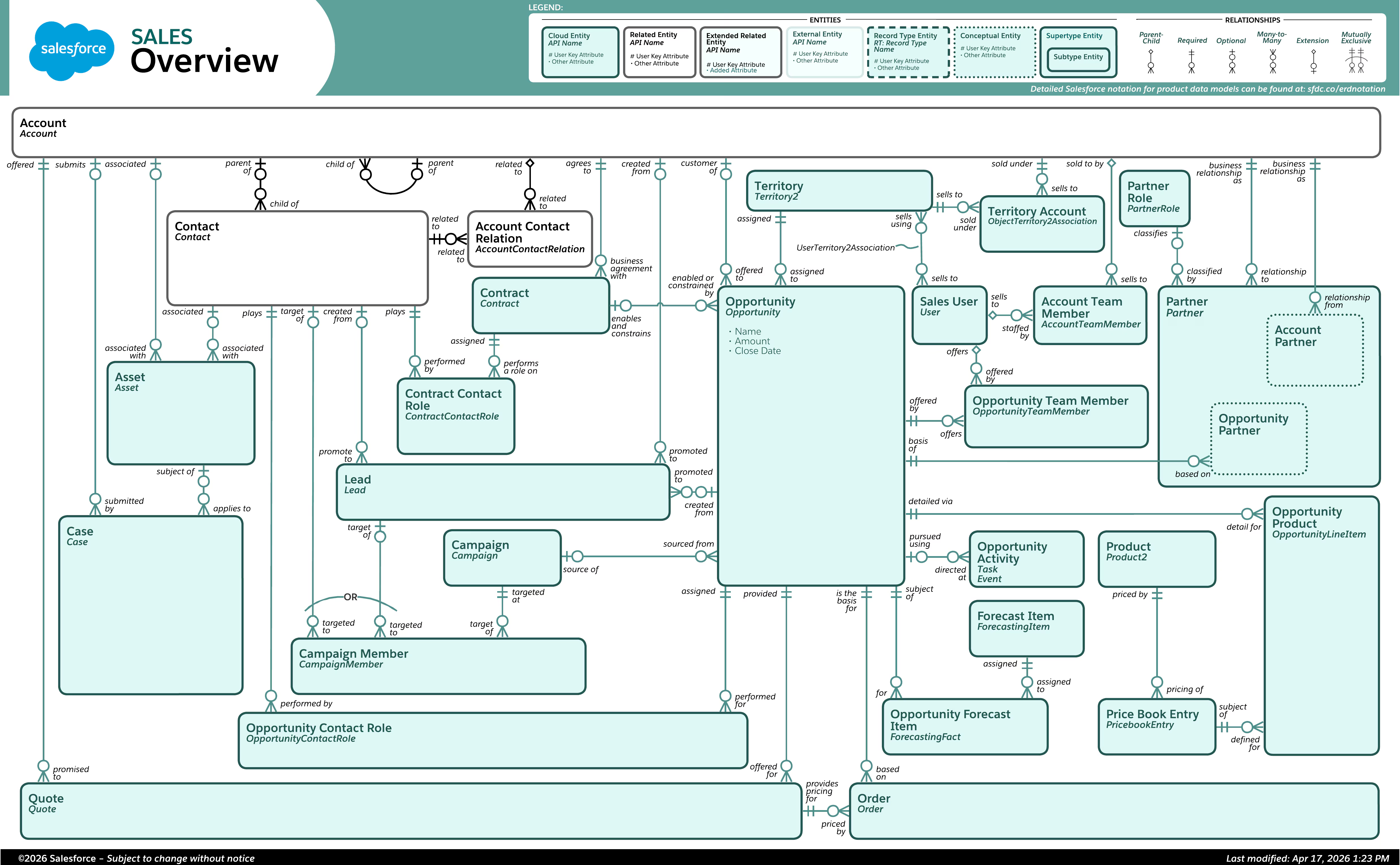
An Entity Relationship Diagram (ERD) shows how the entities in a technical ecosystem relate to and interact with one another. It is the data model drawn as a picture: boxes for objects, lines for relationships, with the line style or notation indicating the relationship's type and cardinality (one-to-many, many-to-many).
The ERD is to data what the process map (Module 5) is to workflow: the shared artifact that lets business people and technical people point at the same picture. BAs read ERDs constantly and often draft simple ones during discovery. Practice sketching them by hand: an ERD scribbled on a whiteboard mid-workshop, confirmed with stakeholders on the spot, prevents weeks of downstream confusion.
The Seven Relationship Types
Salesforce supports seven distinct ways entities relate. The first two you have met; all seven belong in your vocabulary, each anchored by an example.
1. Master-Detail. Records are linked so the master record's behaviors control the detail record's behaviors: deletion cascades, and the detail inherits ownership and security from its master. Example: a master Property record with multiple Offer records from prospective buyers.
2. Lookup. Links two records with independent lifecycles: the everyday relationship. Example: one Account with multiple Contact records associated with it.
3. External Lookup
3. External Lookup. Links a child object (standard, custom, or external) to a parent external object: an object whose data actually lives outside Salesforce and is viewed through a connection rather than imported. Example: an external Business Partner account linked to an internal Account record as well as an external Sales Orders object.
4. Indirect Lookup
4. Indirect Lookup. Links an external child object to a parent standard or custom object inside Salesforce, used when the two systems' IDs do not match: the link is made on another unique field instead. Example: linking order records from an external sales platform to a parent Account in Salesforce when the customer IDs differ between the two systems.
(External and indirect lookups matter whenever a client keeps…
(External and indirect lookups matter whenever a client keeps some data in another system: an external ERP, an order platform, a legacy database. If discovery reveals "that data stays in the other system," these are the relationship types the architect will reach for, and your requirement should capture which fields link the systems.)
5. Many-to-Many
5. Many-to-Many. Links multiple records of one object to multiple records of another, built from two master-detail relationships through a junction object in the middle. Example: assigning speakers to conference sessions via a "Session Speaker" junction object, allowing one speaker to speak at multiple sessions and one session to feature multiple speakers. The junction object is the pattern to recognize: whenever the business says "many of these relate to many of those," a junction object (which often accumulates its own useful fields, like "role" or "date assigned") is the standard answer.
6. Hierarchical. A special lookup available on the User object that associates users with one another. Example: designating one user as another's manager, or adding a user as CEO in a company's role structure.
7. Self. A relationship linking an object to itself. Example: linking smaller child campaigns to a larger parent campaign, enabling structures like a fundraising campaign with regional sub-campaigns rolling up beneath it.
Entity Relationship Diagram
Worked Example: Modeling a Volunteer Program
Let's put every concept to work. Kaimana Community Alliance (fictional) runs volunteer programs across several sites and tells you, in discovery:
"We run recurring events at our sites. Volunteers sign up for shifts at events. Some volunteers are also donors. We need to know who showed up, how many hours they gave, and which of our corporate partners sent them. Oh, and youth volunteers have a different intake process with guardian consent."
Translate, sentence by sentence, into data model:
- "Volunteers sign up for shifts at events." Volunteers are people: Contacts (standard object: reuse it). Events and Shifts are custom objects. A Shift cannot exist without its Event: master-detail (Event is master, Shift is detail). A volunteer signing up for a shift is many-to-many (one volunteer works many shifts; one shift has many volunteers): a junction object, call it Shift Signup, between Contact and Shift. Hours worked and attendance status live naturally on the junction object: they describe the signup, not the person or the shift alone.
- "Some volunteers are also donors." Same person, two roles: one Contact record, not two objects. Their donations would relate to the same Contact: this is why person-things should almost always be Contacts rather than scattered custom objects.
- "Which corporate partners sent them." Corporate partners are Accounts (standard object). A lookup from Contact to Account covers employment/affiliation: loose coupling is right, because the volunteer exists independently of the partner company.
- "Youth volunteers have a different intake process with guardian consent." Same object (Contact), different process and fields: record types (Adult Volunteer, Youth Volunteer), with the youth layout surfacing guardian-consent fields, and picklists differing where processes differ.
- "How many hours they gave." Hours are captured per Shift Signup; totals per volunteer and per event are reporting questions (Module 9), and the master-detail structure makes roll-ups natural.
Sketch the ERD: Account links to Contact by lookup; Contact and Shift connect through the Shift Signup junction object (master-detail on both sides); Shift is master-detail to Event; and Contact carries the two record types. Six sentences of stakeholder speech became five objects, three relationship types, record types, and layout requirements. That translation, spoken requirement to sketched model, validated back with the stakeholder in their own words ("so every signup belongs to exactly one shift, and if you cancel an event, its shifts and signups go away: is that right?"), is precisely the skill this module exists to build.
Notice that final validation question surfaced a business rule hiding in the technical choice: maybe the client wants to keep attendance history even for cancelled events, which argues against cascade deletion somewhere in the chain. Data-model conversations are requirements conversations. That is the whole point.
The BA's Data Checklist
In any discovery involving data (which is all of them), work through:
- What things do we track? (Objects: standard where possible, custom where needed)
- What describes each thing? (Fields, with types and valid values)
- How do the things relate? (Relationships, with the "can it exist alone?" test)
- Do variations share an identity? (Record types versus separate objects)
- Who sees what, arranged how? (Page layouts now; security in Module 7)
- Does any data live outside Salesforce? (External/indirect lookups, integrations: Module 11)
- What totals and views will people need? (Drives roll-ups and reporting: Module 9)
Bring this checklist to design sessions and you will never sit silent in one.
Key Takeaways
- The data model is the blueprint of objects (tables), fields (columns), and relationships that defines how an org stores and connects its data. BAs must read it fluently, even if they rarely build it.
- Prefer standard objects (Account, Contact, Opportunity, Case, Lead) where they fit; create custom objects for what remains. Field types encode business rules: picklists over free text wherever values are known.
- Lookup = loose, independent lifecycles. Master-detail = tight coupling with cascade delete and inheritance. Decide by asking whether the child can exist meaningfully alone.
- Record types let one object carry multiple business processes; page layouts shape what each audience sees; Schema Builder shows the whole model visually.
- Custom metadata types and custom settings store configuration as data, letting business rules change without code changes.
- Know all seven relationship types: master-detail, lookup, external lookup, indirect lookup, many-to-many (junction objects), hierarchical, and self.
- Every stakeholder sentence about their business hides data-model structure. Translating speech into sketched ERDs, and validating the sketch back in business language, is core BA craft.
Knowledge Check
8 questions. Answer at your own pace, then check the explanation for each.
Module 6 complete
Nice work. Review any question again using the menu (top right), or move on.